Thursday, September 23, 2010

Sharepoint error when trying to edit a list using the Edit function in Datasheet

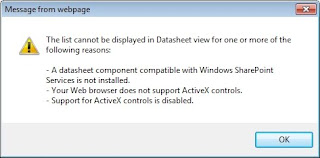
If you have installed the 64-bit new version of Microsoft Office, Office 2010, then you will most likely see the following message when trying to edit a SharePoint list using the Edit in datasheet function:

The list cannot be displayed in Datasheet view for one or more of the following reasons:

- A datasheet component compatible with Windows SharePoint Services is not installed.

- Your Web browser does not support ActiveX controls

- Support for AxtiveX controls is disabled


The issue revolves around the fact that 64-bit versions of Office 2010 do not ship with the 32-bit Activex control that would make the datasheet option work with Internet Explorer.

There are ways to make this work, and the usual suggestion is to find a copy of an Office 2007 product and either install it (such as SharePoint Designer 2007) or just choose to install the Windows SharePoint Services components of the product. This works, but I don't really want to go to that much trouble.
Another solution, and the one that I employed, is to install the 2007 Office System Driver: Data Connectivity Components. After installing the Components, go back to the menu and the datasheet option will work great.
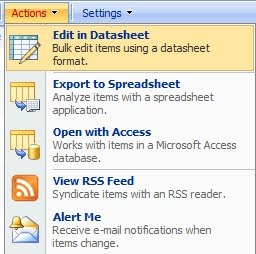

Another solution, is to install the 2007 Office System Driver: Data Connectivity Components
<http://www.microsoft.com/downloads/details.aspx?familyid=7554F536-8C28-
4598-9B72-EF94E038C891&displaylang=en> . After installing the Components, go back to the menu and the datasheet option will work great.

Excerpts from:
-->
-->


Wednesday, September 1, 2010

How to lock computer in Remote Desktop Connection?

It is quite easy to do that. Simply create shortcut as follow.

  • Right click on the Desktop
  • Choose New –>> Shortcuts
  • And then in the dialog box type the following


rundll32 user32.dll,LockWorkStation

After that give the shortcut whatever name you like. Next time, when you want to lock your computer, simply double click on that shortcut and it’s all set!!!

---->>


Monday, August 23, 2010

IE Error: This Page Has Been Modified to Prevent Cross Site Scripting

In IE, click Tools -> Internet Options -> Click the Security Tab -> Click the "Custom Level" button -> Scroll towards the bottom until you see "XSS Filter". Click Disable. Click ok, and ok again. You may need to restart your browser. You can always turn it back on by doing these steps again and simply clicking Enable.

More info about this IE Error

Tuesday, July 6, 2010

The Recycle Bin on C:\ is Corrupted. Do you want to empty the Recycle Bin for this drive?

This worked for WINDOWS 7 Machines.

Go to Command Prompt:

C:\>rd /s c:\$Recycle.Bin
C:\$Recycle.Bin, Are you sure (Y/N)? --> Y (hit enter)
C:\>


then reboot, Windows automatically makes a new empty recycle bin:

for those with other OS's you need to know the name of you recycle bin it could be recycled or recycler check your properties tab for the recyle bin folder for the folder name then go to command prompt and just substitute the correct name

i.e.
C:\>rd /s c:\recycler
C:\recycler, Are you sure (Y/N)? y
or C:\>rd /s c:\recycled
C:\recycled, Are you sure (Y/N)? y


if you type in the wrong name you will get "The system cannot find the file specified."
then you need to go back and find out for sure what your folder name is.


NOTE OF WARNING: if you do this everthing in your recycle bin will be deleted permantly


Thursday, June 24, 2010

Network printer is showing offline and is not printing

This issue occurs if the printer spooler is corrupt. Please follow the steps below to reset the spooler.


Reset Spooler

  1. Click Start, click Run, type "Services.msc" (without the quotation marks) in the open box and click OK.
  2. Double-click "Printer Spooler" in the Services list.
  3. Click Stop and click OK.
  4. Click Start, click Run, type "%WINDIR%\system32\spool\printers" in the open window, and delete all files in this folder.
  5. Click Start, click Run, type "Services.msc" (without the quotation marks) in the open box.

Another possible cause is your security programs. They may block the some ports that you are using to communicate with the printer. I suggest that you temporary disable all of them and then check the result again.


social.technet.microsoft.com